
Moderador: Moderadores

- 27 Sep 2009, 19:32
#143734
Txak PES Blog
No resuelvo dudas por Mensaje Privado, utilizad el foro.
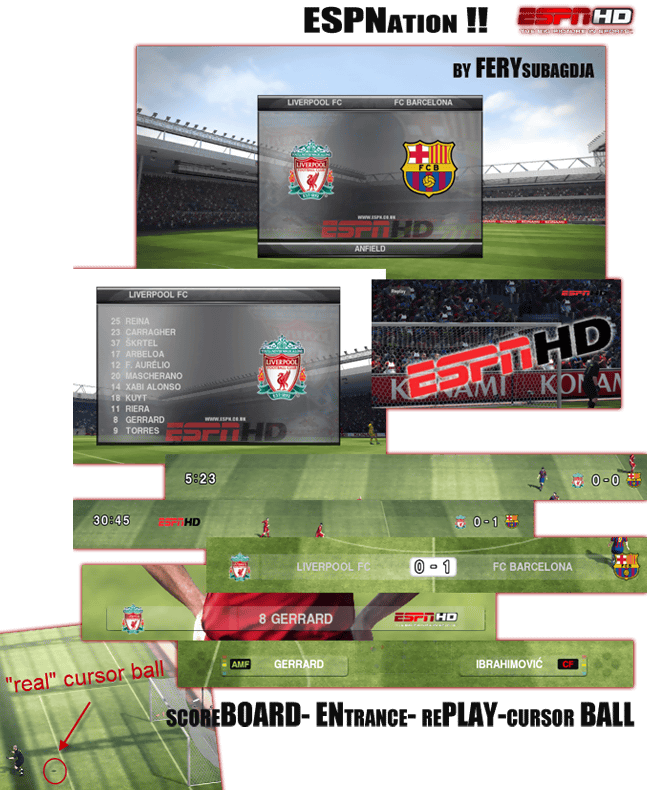
ferysubagdja escribió:[ Imagen ]
Download :
FILEFRONT
SPEEDY SHARE
INDOWEBSTER
Installation:
*IMPORTANT* Back up dt05_e.img and dt06.img
Open Game Graphic Studio 7.4.0 - (NOTE: Vista Users: Run as Administrator)
1. open dt0b.img in (C:...Pro Evolution Soccer 2010 Demoimg) >> click yes
Find "unnamed_1.bin", right click and choose "Importe a file over this one" and choose "unname_1.bin" from downloaded folder.
2. Open "dt05_e.img" in C:...Pro Evolution Soccer 2010 Demoimg >> click yes
Find "unnamed_54.bin", right click and choose "Importe a file over this one" and choose "unname_54.bin" from downloaded folder.
3. Open "dt06.im" in C:...Pro Evolution Soccer 2010 Demoimg >> click yes
Find "unnamed_164.bin", right click and choose "Importe a file over this one" and choose "unname_164.bin" from downloaded folder.
4. Open "dt06.im" in C:...Pro Evolution Soccer 2010 Demoimg >> click yes
Find "unnamed_973.bin", right click and choose "Importe a file over this one" and choose "unname_973.bin" from downloaded folder.
5. Done and close GGS
Play PES 2010 Demo and enjoy .....
credit to :
- Mod@y
- moeom
Última edición por Txak el 27 Sep 2009, 19:36, editado 1 vez en total.
No resuelvo dudas por Mensaje Privado, utilizad el foro.







- 27 Sep 2009, 19:54
#143754

VirtuaRED en X: https://twitter.com/VirtuaRED
VirtuaRED en WhatsApp: https://whatsapp.com/channel/0029VaDICAhLtOjAbBDb1x3I
VirtuaRED en Facebook: https://www.facebook.com/VirtuaRED
VirtuaRED en YouTube: https://www.youtube.com/channel/UCsMkBR ... ih7w/about
Mola mucho todo esto!!
VirtuaRED en X: https://twitter.com/VirtuaRED
VirtuaRED en WhatsApp: https://whatsapp.com/channel/0029VaDICAhLtOjAbBDb1x3I
VirtuaRED en Facebook: https://www.facebook.com/VirtuaRED
VirtuaRED en YouTube: https://www.youtube.com/channel/UCsMkBR ... ih7w/about




- 27 Sep 2009, 21:40
#143802
¡Sígueme en Twitter! --> @albertobb7
¡Pregúntame lo que quieras! --> @albertobb7

Esperando Transformers 4...




jagmig escribió:orale gracias por la descarga, es para PES 2009 VDD??No, es para PES 2010...
¡Pregúntame lo que quieras! --> @albertobb7
Esperando Transformers 4...

- 27 Sep 2009, 23:00
#143818
El 98% de los adolescentes (Del MUNDO) morirían si Facebook u otra Red Social cayera. Si eres del dichoso 2% que estaría cagado de la risa, copia y pega esto en tu firma.
gracias Txak